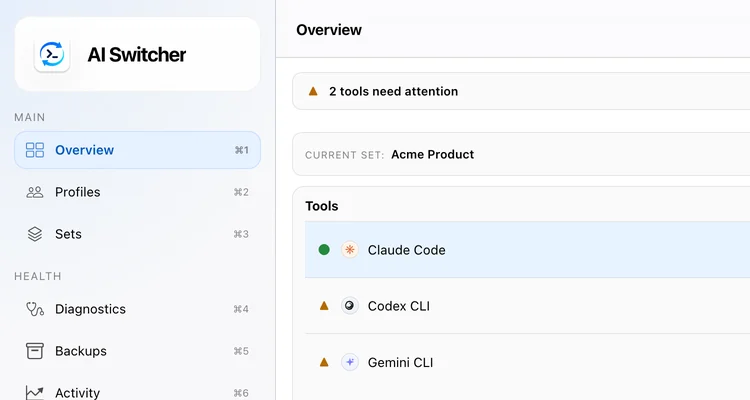
Switch coding-agent accounts in one command.The account switcher for Claude Code, Codex CLI, Gemini CLI and Antigravity CLI.
Save each login once as a named profile, then switch one agent or all four together without logging out, keep the right account in every repository, and check what is live before you start work.
$brew install burakdede/tap/aisw
$curl -fsSL https://raw.githubusercontent.com/burakdede/aisw/main/install.sh | sh
$cargo install aisw
Then run aisw init to save the accounts you are already signed into.
~$aisw add claude work Claude sign-in will continue in your browser. Waiting for Claude login...Added profile───────────── Tool : Claude Code Profile : work Auth : oauth Activation : storedNext Run 'aisw use claude work' to activate it.
Add an account with OAuth: aisw opens Claude's own sign-in in your browser and saves it as a profile named work.
Example sessions. personal, work and work-api-key are profile names you choose; the output follows the aisw CLI's formats.
Each coding agent keeps its credentials somewhere different, so switching by hand means logging out, copying hidden files, and guessing which account is still active.
aisw saves each login as a named profile, writes it back to the place that agent already reads from, and records what is active.
Claude CodemacOS Keychain or local files
Codex CLIauth.json or system keyring
Gemini CLIfiles under ~/.gemini
Antigravity CLIsystem keyring and ~/.gemini
aisw profiles~/.aisw, owner-only permissions
From one login to every repository.
Profiles, contexts and workspace rules build on each other. Use as much as your setup needs.
Switch a whole client setup by name
A context maps the right profile for each agent under one name, even when the profile names differ. One command moves all four together, as a single transaction.
$ aisw context create work \
    --claude work \
    --codex work-api-key \
    --gemini work \
    --antigravity work
$ aisw context use work
  Claude Code -> work (isolated)
  Codex CLI -> work-api-key (isolated)
Add accounts the way you sign in
Sign in through the provider's own OAuth login, save an API key, or keep the account you are already signed into without signing out.
# OAuth: sign in in the browser$ aisw add claude work
# API key$ aisw add codex work-api-key \
--api-key "$OPENAI_API_KEY"
# the login you're already using$ aisw add claude personal --from-live
Bind a whole GitHub org
One Git remote rule covers every repository from an organization, including the ones you clone next week.
$ aisw workspace bind \
  --git-remote "github.com/your-org/*" \
  --context work
aisw takes a backup before it switches and rolls back if a write fails.
$ aisw use codex work-api-key
Backup created before switching.$ aisw backup list
Your credentials never leave your machine.
aisw works with the credential files and operating-system keyrings the agents already use. It does not route model requests, read prompts, or upload anything. Every switch snapshots the previous state first, so a failed switch rolls back instead of leaving you half-switched.
Prompts and API traffic go straight to the provider.
Native storage
System keyrings and owner-only files.
Rollback
A backup before every switch, restored on failure.
Open source
MIT licensed and written in Rust.
Guides for the switch you are trying to make.
Most people arrive with one concrete problem: two Claude Code accounts, a personal Codex CLI login that keeps leaking into client work, a Gemini CLI or Antigravity CLI login on the wrong repository. Each guide starts from that problem and ends with a working setup.
The questions people ask before they trust a switching workflow with work and client accounts.
What is aisw?
aisw is the command-line tool behind AI Switcher. It is an open-source Rust CLI that saves each Claude Code, Codex CLI, Gemini CLI, and Antigravity CLI login as a named profile, switches one agent or all four with one command, and can warn or block when a repository is opened with the wrong account. It runs locally on macOS, Linux, and Windows.
How do I switch between Claude Code, Codex CLI, Gemini CLI, or Antigravity CLI accounts?
Save each account as a named AI Switcher profile, then activate the one you need with one command. You can switch one tool at a time, switch all tools that share the same profile name, or switch a saved cross-tool context that maps different profiles together.
Can I keep work, personal, and client accounts separate on one machine?
Yes. AI Switcher is built for exactly that setup. You can keep separate named profiles per tool, group them into a work or client context, and bind repositories to the context they should use so the wrong account is caught before you start coding.
Does AI Switcher require a cloud account or proxy my prompts?
No. AI Switcher is local-only. It uses the credential files and system keyrings the upstream tools already use, without routing model traffic, inspecting prompts, or syncing credentials to a backend.
How do I log in to a second Claude Code or Codex CLI account?
Sign in with the tool's own login flow, /login in Claude Code or codex login for Codex CLI, then save that login as a named profile with aisw add claude <name> or aisw add codex <name>. The provider still handles authentication; AI Switcher names the logins you already have and switches between them.
Can I use multiple Claude Code accounts on one computer?
Yes. Save each account as its own profile, such as work and personal, and run aisw use claude <name> before starting Claude Code. A switch applies to the next Claude Code process, not to a conversation that is already running, so start a new session after switching.
Does switching work in VS Code and Cursor?
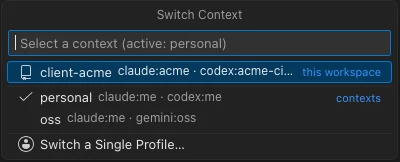
Yes. Run aisw in the integrated terminal, or install the AI Switcher extension for VS Code and Cursor, which shows the active context and profile in the status bar and switches from a Quick Pick. Start a new agent process after switching so it picks up the new account.
Does aisw switch accounts automatically when I change folders?
No. Switching is always a command you run. What aisw does automatically is check: bind a folder, repository, or Git remote to a context, and the workspace guard warns or refuses to start Claude Code, Codex CLI, Gemini CLI, or Antigravity CLI there when the wrong accounts are active, and prints the command that fixes it.
Does it work with Claude Pro or Max, ChatGPT, and API keys?
Yes. Any login made through the provider's own sign-in, such as a Claude Pro or Max subscription, a ChatGPT account for Codex CLI, or a Google account for Gemini CLI, can be saved as a profile, and so can an API key. AI Switcher does not create accounts or bypass provider sign-in.
What if my profile names do not match across tools?
Use a context. A context lets Claude Code, Codex CLI, Gemini CLI, and Antigravity CLI each keep their own profile names while still switching as one saved setup, such as a personal workspace or a client account bundle.
Make your next account switch a single command.
Install aisw, run aisw init, and the accounts you are signed into become named profiles.
$brew install burakdede/tap/aisw
$curl -fsSL https://raw.githubusercontent.com/burakdede/aisw/main/install.sh | sh

 Antigravity CLI